
ClipferryThe clipboard manager for Mac and iPhone
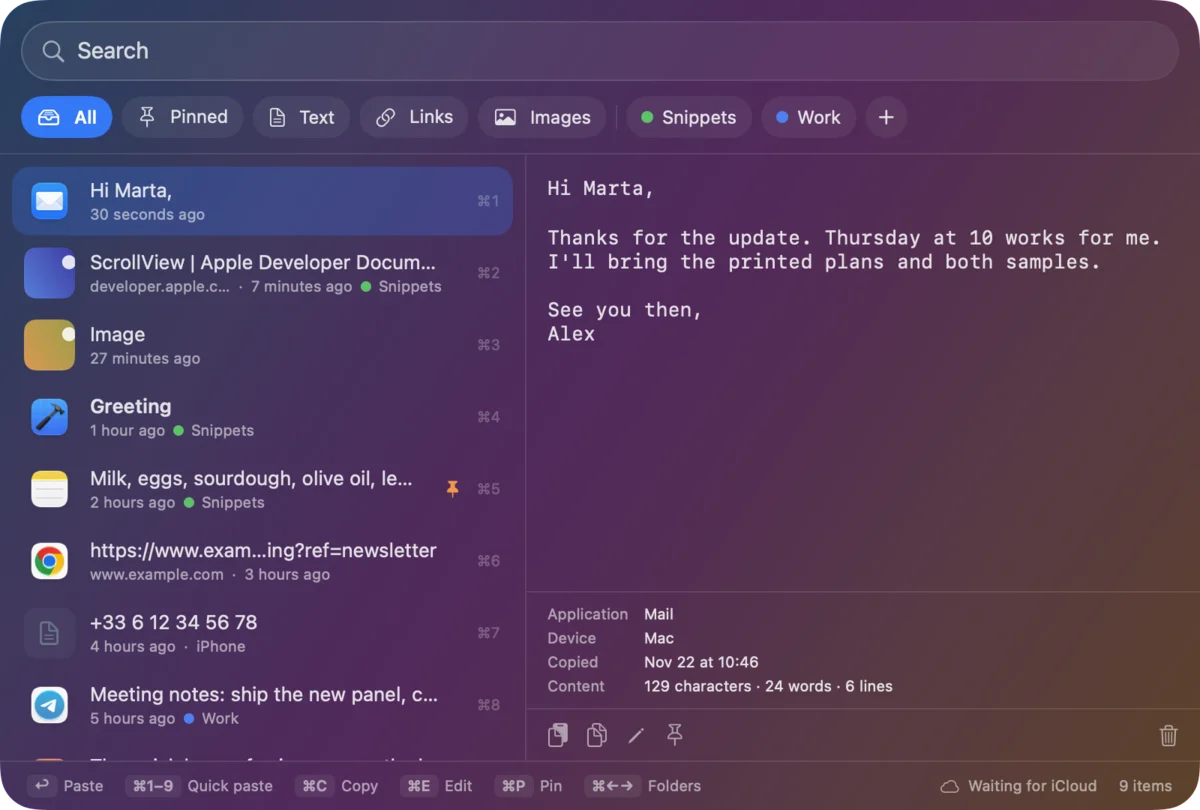
Clipferry keeps everything you copy, text, links and images, and brings it back with ⇧⌘V. Paste into any app, pin what matters, sort clips into coloured folders and find anything in a second. Your history syncs between Mac, iPhone and iPad through your own iCloud.
Free to start · Clipferry Pro is a one-time purchase · No subscription
Take Clipferry apart.
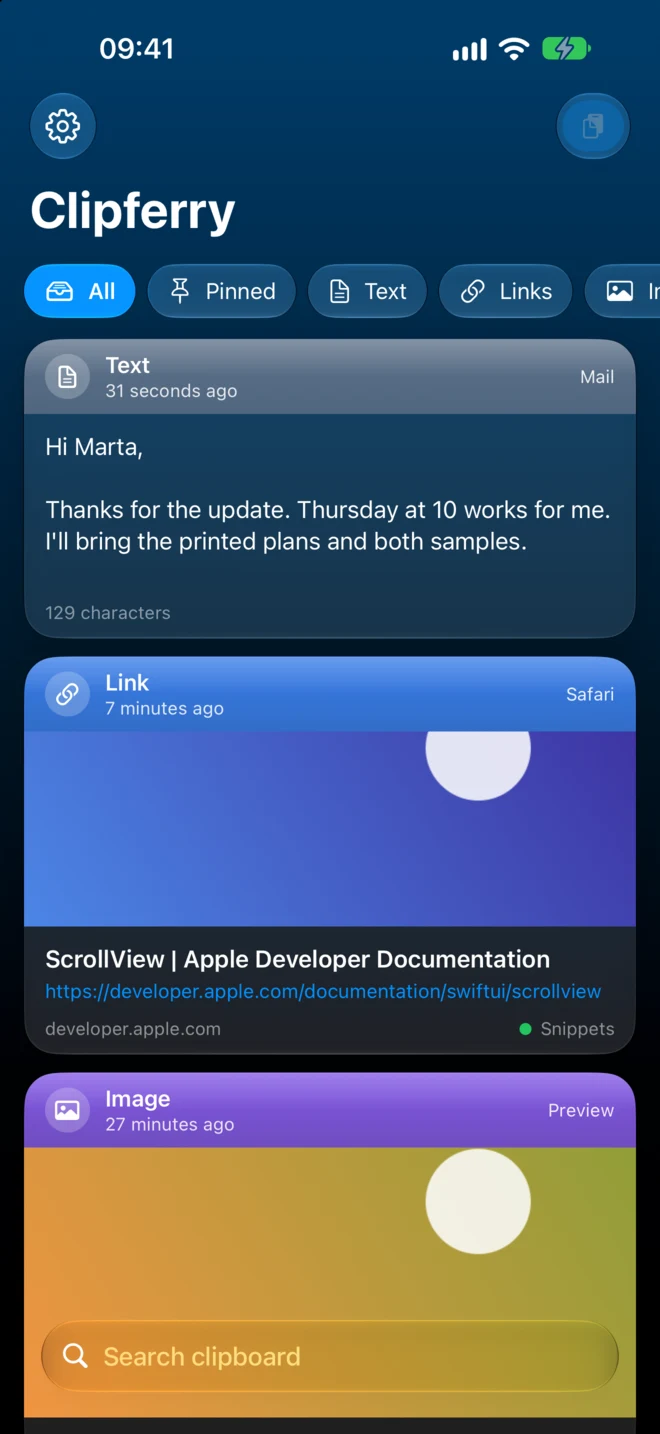
Scroll to pull the iPhone screen apart, layer by layer, and see what each part does for you.
- 01
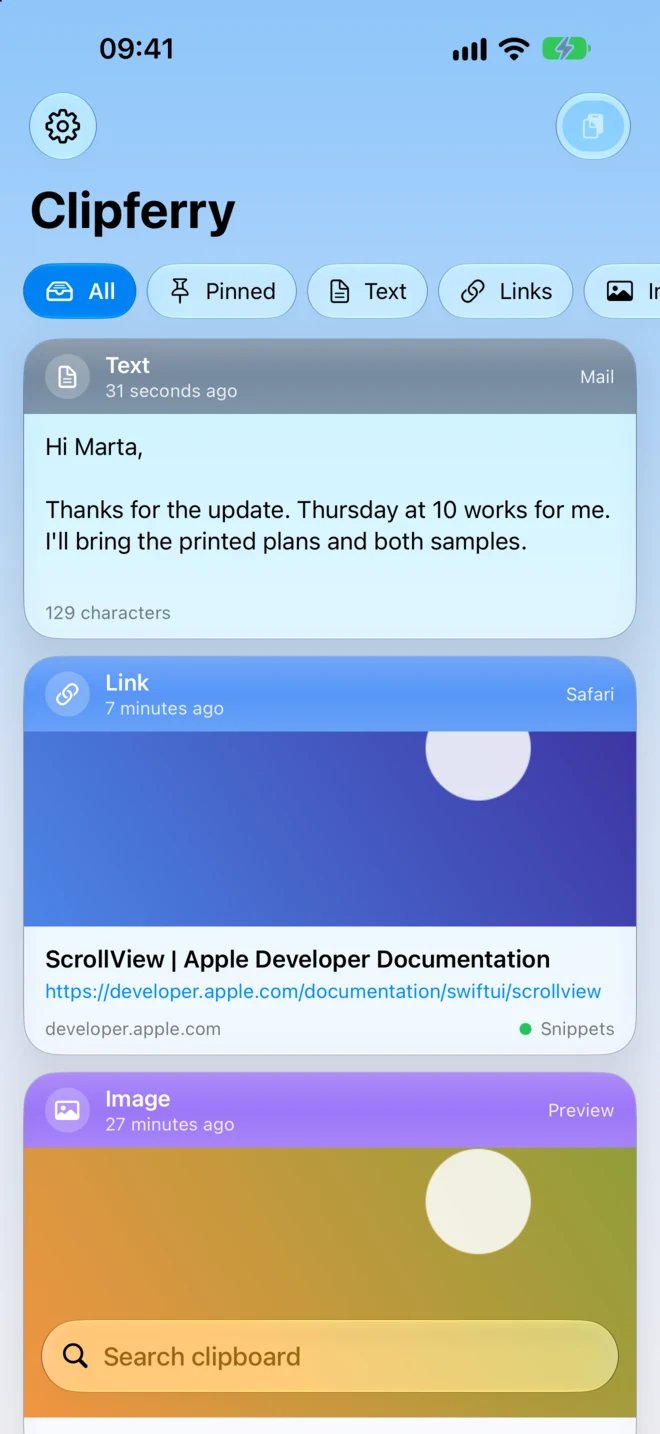
Filters and folders
All, Pinned, Text, Links and Images, then your own coloured folders. One tap narrows thousands of clips to the few you need.
- 02
Every clip keeps its context
Each card shows what you copied, from which app, on which device and when. Copy it again, pin it, edit the text or file it in a folder.
- 03
Links come with a preview
Copied links get their page title and image, so you recognise them at a glance. Previews are optional and only fetch public web addresses.
- 04
Search everything
The search bar sits under your thumb and looks through every clip as you type.
- 05
Your iCloud underneath
With Pro, clips sync between Mac, iPhone and iPad through the private database of your own iCloud account. There is no Clipferry account and no server of ours in the middle.
no Clipferry account
Thanks for the update. Thursday at 10 works for me.
Press ⇧⌘V. Everything you copied is there.
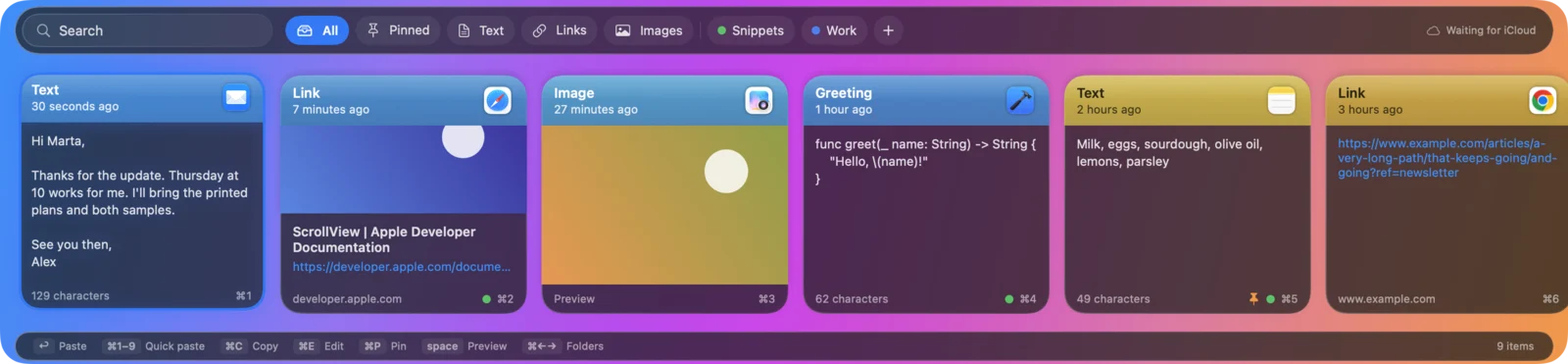
Clipferry lives in the menu bar and records what you copy. The shortcut opens your history over any app: press Return or click a clip and it is pasted where you were typing. Choose the look you prefer.
Paste where you are
Return or a click pastes into the app you were using, as plain text.
Quick paste
Paste any of the nine latest clips without touching the mouse.
Pin it
Pinned clips and clips in folders are always kept.
Edit before pasting
Fix a typo or trim a clip, then paste the clean version.
Copy several things. Paste them in order.
Turn on Paste Stack with ⇧⌘C, copy a name, an address and a phone number, then press ⌘V three times: they come out in the order you copied them. Perfect for filling forms.
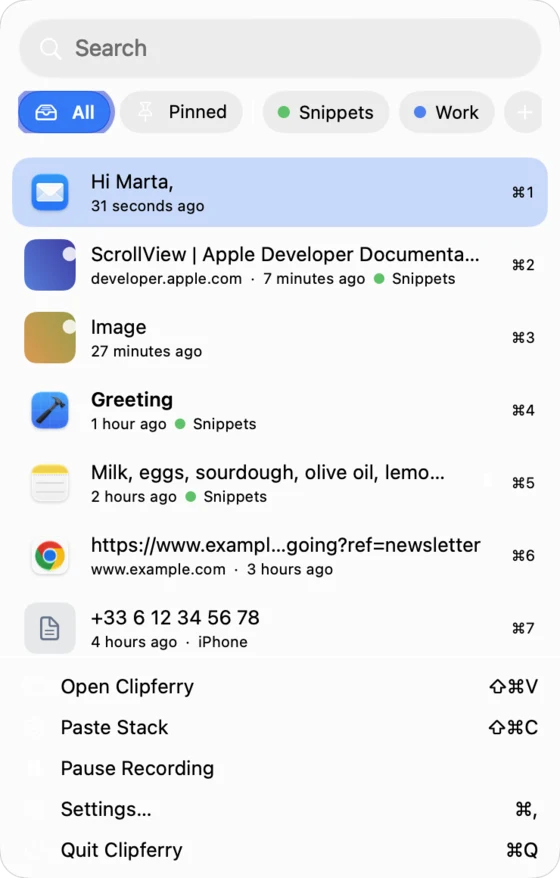
A panel in the menu bar
Click the Clipferry icon for search, folders and recent clips. A click pastes.
Pause recording
Stop saving for a moment, or exclude apps such as your password manager for good.
Coming from Paste?
Import your Paste history and pinboards in one go. Pinboards become coloured folders.
- Alex Morgan
- 12 Harbour Street
- +33 6 12 34 56 78
Your Mac clipboard, in your pocket.
The same glass cards as on the Mac. Browse, search and filter your clips, copy one with a tap, pin it, edit it or file it. The paste button adds whatever is on the iPhone clipboard, so it reaches your Mac too.
Copy on Mac, paste on iPhone
With Pro, a clip saved on one device appears on the others through iCloud.
Shortcuts and Siri
Say "Add to Clipferry", "Search Clipferry" or "Get my latest Clipferry clip", or use the actions in Shortcuts.
Light, dark and glass
Choose how much shows through: Clear, Glass, Frosted or Solid.
Let your AI assistant read your clipboard, only when you say so.
Clipferry for Mac includes an MCP server. Switch it on and AI apps such as Claude can search your clips, read one, add a clip, list your folders and move a clip into a folder. It is off by default, runs only on your Mac and accepts only apps you give the access token to.
- Off until you enable it
- Local to your Mac
- Token required
- 5 tools, no more
A clipboard sees everything. Ours keeps it to itself.
Passwords are skipped
Clipferry ignores content that apps mark as confidential, such as passwords, and temporary data. Both are on by default.
Excluded apps
Add any app to the excluded list and nothing copied from it is ever saved.
Your iCloud, not ours
Sync uses the private database of your iCloud account. NextStar Systems has no server and no copy of your clips.
Hidden from screen sharing
One switch hides the panel from screen sharing, recordings and screenshots.
Careful link previews
Previews are optional and only fetch public addresses, never your local network.
No account
No sign-up, no email, no tracking. Open the app and copy.
Start free. Pay once for the rest.
Clipferry Pro is a single one-time purchase for Mac and iPhone. No subscription, and Family Sharing is on.
Free
$0
- Clipboard history on one device
- Last 24 hours of history
- Pins
- Search, filters and quick paste
- Older clips kept and locked, never deleted
Clipferry Pro
One-time purchase
- iCloud sync between Mac, iPhone and iPad
- Full history: keep a week, a month, a year or forever
- Coloured folders
- Paste Stack
- AI tools (MCP) for Claude and other apps
Clipferry in one minute.
Clipferry is a clipboard manager for Mac, iPhone and iPad made by NextStar Systems, previously announced as Pastesync. It saves the text, links and images you copy, opens with Shift-Command-V, pastes into any app and syncs through your own iCloud. It is free to start, and Clipferry Pro is a one-time purchase with no subscription.
- Platforms
- Mac, iPhone, iPadmacOS 14 · iOS and iPadOS 17 or later
- Price
- Free + ProPro is a one-time purchase
- Saves
- Text, links, imageswith source app and device
- Shortcut
- ⇧⌘Vcustomisable, quick paste ⌘1–9
- Sync
- iCloudyour private database, Pro
- Automation
- Shortcuts, Siri, MCP3 actions, 5 AI tools
- Privacy
- No accountskips passwords, excluded apps
- Availability
- Coming soonApp Store, Mac and iPhone
What is Clipferry?
Clipferry is a clipboard manager for Mac, iPhone and iPad made by NextStar Systems. It saves the text, links and images you copy, opens your history with Shift-Command-V on the Mac, pastes a clip into any app and lets you pin clips and sort them into coloured folders. With Clipferry Pro your history syncs between your devices through your own iCloud.
Is Clipferry the new Pastesync?
Yes. Pastesync, the clipboard manager announced on this site for Mac and iPhone, was rebuilt and renamed Clipferry. The old Pastesync pages now lead here.
When and where can I get Clipferry?
Clipferry is coming soon to the App Store for Mac, iPhone and iPad. This page will link to it as soon as it is live.
What is the difference between Free and Pro?
The free version works on one device and shows the last 24 hours of history, with pins, search, filters and quick paste. Older clips are kept and shown as locked, never deleted. Clipferry Pro adds iCloud sync between Mac, iPhone and iPad, your full history (keep a week, a month, a year or forever), coloured folders, Paste Stack and the AI tools. Pro is a single one-time purchase for Mac and iPhone, with Family Sharing.
How do I open Clipferry and paste on a Mac?
Press Shift-Command-V (you can choose another shortcut), then press Return or click a clip to paste it into the app you were using. Command-1 to Command-9 paste the nine latest clips. To paste for you, Clipferry needs to be switched on in System Settings, Privacy & Security, Accessibility; it only uses this to send Command-V. Clips are always pasted as plain text.
How does sync between Mac and iPhone work?
With Clipferry Pro, clips sync through the private database of your own iCloud account. There is no Clipferry account and no NextStar Systems server: we never see your clips.
Does Clipferry save my passwords?
No. By default Clipferry ignores content that apps mark as confidential, such as passwords from a password manager, and temporary data. You can also add apps to an excluded list so nothing copied from them is ever saved, and pause recording at any time.
What is Paste Stack?
Paste Stack, in Clipferry Pro for Mac, lets you copy several things in a row and paste them in the same order. Turn it on with Shift-Command-C, copy each item, then press Command-V repeatedly. It is handy for filling in forms.
Can Claude or other AI apps use Clipferry?
Yes, on the Mac with Clipferry Pro. Clipferry includes a local MCP server that AI apps such as Claude can use to search clips, read a clip, add a clip, list folders and move a clip into a folder. It is off by default, runs only on your Mac and only accepts apps you give the access token to.
Does it work with Shortcuts and Siri?
Yes. Clipferry adds three actions: Add to Clipferry, Search Clipferry and Get Latest Clipferry Clip. Use them in the Shortcuts app or ask Siri.
Can I import my history from Paste?
Yes. Clipferry for Mac can copy your Paste history and pinboards into Clipferry, turning pinboards into coloured folders. Paste itself is not changed.
Which devices does Clipferry support?
Clipferry runs on Macs with macOS 14 or later (menu-bar app) and on iPhone and iPad with iOS or iPadOS 17 or later.
Never lose a copy again.
Clipferry is coming to the App Store for Mac, iPhone and iPad. Free to start, Pro once, no subscription.